Muse AI Agent: Complete Guide to Meta’s Personal AI Assistant
Meta Muse AI Agent is a personal artificial intelligence tool designed to do more than answer questions. It can browse the web, use connected applications, complete multi-step tasks, create documents and images, monitor goals, and perform selected actions on a user’s behalf with permission.
Unlike a traditional chatbot, Muse is built as an agentic AI assistant. This means it can plan tasks, use tools, interact with websites, and continue working in the background instead of simply generating a text response. Meta describes Muse as an AI that helps users get everyday work done across email, calendars, shopping, travel, documents, reminders, and other connected services. ai.meta
What Is Muse AI Agent?
Muse AI Agent is Meta’s personal AI agent for completing everyday digital tasks. Users can communicate with Muse through conversation and give it a goal, instruction, or problem to solve.
For example, instead of asking:
“What are the best hotels in Lahore?”
You could ask:
“Find three hotels in Lahore for next weekend, compare their prices and reviews, and prepare the best option for my approval.”
Muse can potentially research the options, organize the results, and help complete the next steps. However, users should review important information before making bookings, purchases, or sharing personal data.
Meta says Muse can answer questions, browse the web, generate images, create documents, make purchases, connect with applications through Connectors, set reminders, track goals, and monitor selected information in the background. ai.meta
Muse AI Agent at a Glance
| Feature | Description |
|---|---|
| Product | Meta Muse AI Agent |
| Category | Personal AI agent and agentic AI assistant |
| Main purpose | Completing tasks and managing digital activities |
| Interaction | Natural-language conversation |
| Platforms | Muse app, Mac, and WhatsApp, depending on availability |
| Web access | Can browse websites and collect information |
| Connected apps | Works with selected applications through Connectors |
| Productivity | Can create documents, organize information, and manage tasks |
| Automation | Can continue monitoring or working in the background |
| User control | Permission settings, approvals, and activity history |
| Pricing | Free access with usage limits and possible paid upgrades, according to Meta |
How Does Muse AI Agent Work?
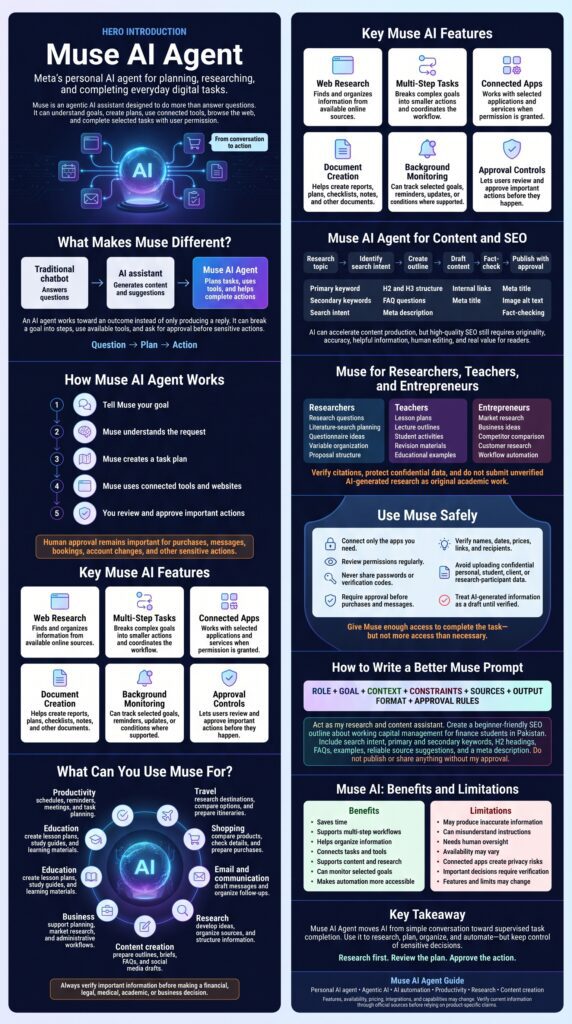
Muse uses an agentic workflow rather than responding to only one prompt. When a user provides a task, the system identifies the required steps, selects relevant tools, performs the work, and reports the results.
A typical Muse workflow may include the following stages:
- Understanding the request: Muse interprets the user’s objective, preferences, deadline, and restrictions.
- Creating an action plan: It breaks a complex objective into smaller steps.
- Selecting tools: It may use web browsing, connected applications, documents, calendars, or other available tools.
- Completing the task: Muse performs research, organizes information, creates content, or interacts with websites.
- Requesting approval: It asks for permission before sensitive actions such as sending messages or making purchases.
- Reporting progress: The user can review the activity, completed steps, and planned actions.
- Continuing background work: For suitable tasks, Muse can continue monitoring information after the user leaves the app.
Meta states that Muse uses connected apps and a secure computer environment to carry out real work. It can also build tools when a required tool does not already exist. ai.meta
Key Features of Meta Muse
Muse works through ordinary conversation. Describe what you want, your budget, deadline, location, brands, conditions, and whether Muse should ask before acting.
Browse the web to find information, compare options, research products, and investigate questions. Always verify results against primary sources.
Muse can work through a sequence of related tasks—find a flight, compare policies, prepare a plan, and ask for approval before booking.
Connect with selected applications through Connectors—email, calendars, social media, documents, shopping, business tools, and more.
Create meeting outlines, reports, research notes, checklists, itineraries, business plans, study materials, and more.
Generate images for blogs, social media, presentations, concept art, educational diagrams, branding, and product mock-ups.
Organize long-term goals and recurring responsibilities. Muse can remind, monitor, track, and suggest next steps.
Assist with product discovery, comparison, and online purchases. Meta says Muse requests permission before certain actions.
Muse AI Agent vs Chatbot
| Capability | Traditional chatbot | AI assistant | Muse AI Agent |
|---|---|---|---|
| Answers questions | Yes | Yes | Yes |
| Generates text | Yes | Yes | Yes |
| Maintains conversation context | Limited to advanced systems | Usually | Designed for ongoing interaction |
| Browses the web | Sometimes | Sometimes | Yes, where available |
| Uses connected apps | Limited | Often available | Core part of its design |
| Completes multi-step tasks | Limited | Some support | Main purpose |
| Takes actions online | Usually no | Limited | Yes, with permissions |
| Works in the background | Rarely | Sometimes | Designed to support monitoring and goals |
| Requests approval for sensitive actions | Not usually applicable | Sometimes | Yes, for selected actions |
| Creates or uses tools | Rarely | Limited | Meta says Muse can build tools when needed |
A chatbot primarily responds. An AI assistant helps with conversations and content. A personal AI agent attempts to achieve an outcome by planning and taking controlled actions.
Practical Use Cases for Muse
Personal Productivity
Organizing tasks, drafting emails, preparing meeting agendas, summarizing information, managing reminders, creating schedules, monitoring deadlines, and preparing follow-up lists.
Travel Planning
“Plan a three-day trip to Islamabad for two adults. Compare transport, hotels, food options, and estimated costs. Prioritize safe locations and a moderate budget. Do not book anything without asking me first.”
Muse can organize research and prepare options, but users should confirm prices, availability, cancellation rules, and travel requirements.
Finance and Business Research
Finance professionals and students can use Muse for explaining financial concepts, creating company research checklists, comparing business models, organizing financial data, drafting budget templates, preparing cash-flow questions, researching industry trends, and creating interview or survey questions.
Muse should not be treated as a replacement for professional financial advice.
Academic Research
Researchers can use Muse to support—not replace—the research process: developing research questions, creating literature-search strategies, structuring a conceptual framework, drafting questionnaire items, organizing variables and hypotheses, preparing interview guides, summarizing user-provided papers, and creating data-analysis checklists.
Always verify every citation, avoid fabricated references, protect confidential data, and disclose AI assistance when required.
Content Creation and SEO
Bloggers can use Muse to create a content workflow: identify search intent, develop keywords, create outlines, draft sections, generate FAQs, prepare meta titles and descriptions, suggest internal links, create social media variations, prepare editorial checklists, and request approval before publishing.
Muse AI Agent Prompts
General Task Prompt
Product Comparison Prompt
SEO Content Prompt
Research Prompt
Email Management Prompt
Monitoring Prompt
Is Muse AI Agent Safe?
Muse includes controls intended to keep users involved in sensitive decisions. Meta says users can review and approve actions such as sending emails and making purchases, manage permissions, and view an audit trail of completed or planned activity. ai.meta
Nevertheless, no AI agent should be given unlimited trust. Follow these precautions:
- Connect only necessary accounts.
- Use strong, unique passwords and multi-factor authentication.
- Review permissions regularly.
- Avoid sharing passwords, authentication codes, or highly sensitive documents in chat.
- Require approval for purchases, payments, messages, and account changes.
- Check website addresses before entering information.
- Verify names, amounts, dates, and recipients.
- Review the audit trail for unexpected activity.
- Do not upload confidential client, student, patient, or research-participant data without proper authorization.
- Treat generated content as a draft until verified.
Give Muse enough access to complete the task, but not enough access to create unnecessary risk.
Advantages of Muse AI Agent
- Saves time on repetitive digital tasks.
- Converts natural-language instructions into action plans.
- Supports multi-step workflows.
- Can research information across the web.
- Connects with selected applications.
- Helps create documents and images.
- Can monitor goals and selected updates.
- Provides approval controls for important actions.
- May help users manage personal and professional work from one interface.
Limitations of Muse
- Incorrect or outdated information.
- Incomplete web research.
- Misunderstanding ambiguous instructions.
- Incorrect calculations or comparisons.
- Limited availability in some locations.
- Usage restrictions or subscription limits.
- Incompatibility with certain websites or apps.
- Errors when handling unusual workflows.
- Privacy risks from excessive account access.
- Potentially unsuitable recommendations.
- Need for human review before consequential actions.
How to Use Muse Effectively
1. Define the Desired Outcome
Weak prompt: “Help with my blog.”
Better prompt: “Create a 1,500-word article outline for Pakistani university students explaining working capital management. Include search intent, beginner-friendly examples, a glossary, five FAQs, and suggestions for internal links.”
2. Add Constraints
Mention budget, location, deadline, target audience, preferred sources, required format, tone, excluded options, and approval requirements.
3. Separate Research from Action
First ask Muse to research and compare options. Then ask it to prepare an action plan. Approve the final action only after reviewing the details.
4. Use Approval Language
5. Request Evidence
For factual tasks, ask Muse to provide source names, publication dates, links, assumptions, uncertainty, calculation methods, and information it could not verify.
6. Check the Final Output
Before using the result, verify names, prices, dates, links, citations, calculations, legal or policy requirements, personal-data exposure, and the exact action Muse plans to take.
SEO Strategy for a Muse AI Agent Article
Primary Keyword: Muse AI Agent
Secondary Keywords: Meta Muse AI, Meta AI agent, Muse personal AI agent, What is Muse AI?, How does Muse AI work?, Muse AI features, Muse AI app, Muse AI assistant, Agentic AI assistant, AI agent for everyday tasks, AI agent for productivity, AI agent for shopping, AI agent for travel planning, AI agent for research, AI agent for email management, Muse AI privacy, Is Muse AI safe?, Muse AI pricing, Muse AI alternatives, Muse AI prompts, Personal AI agent examples, AI automation tools, AI agent connected apps, AI agent browser automation.
Suggested SEO Title: Muse AI Agent: Features, Uses, Safety, Prompts, and Complete Guide
Suggested Meta Description: Learn what Meta Muse AI Agent is, how it works, its features, use cases, privacy controls, safety limits, prompts, pricing information, and productivity benefits.
Suggested URL Slug: /muse-ai-agent/
Suggested Image Alt Text: Meta Muse AI Agent personal productivity assistant · Muse AI agent workflow for connected apps · AI agent planning and completing digital tasks · Muse AI privacy and approval controls
Frequently Asked Questions
Muse AI Agent is Meta’s personal agentic AI system. It is designed to answer questions, browse the web, use connected apps, complete multi-step tasks, create content, monitor goals, and perform selected actions with user oversight.
No. A chatbot mainly responds to messages. Muse is designed to plan and complete tasks across websites and connected applications, making it closer to a personal AI agent than a conventional chatbot.
Muse can research information, browse the web, create documents and images, connect with selected apps, set reminders, track goals, monitor information, and assist with purchases and other tasks. ai.meta
Meta says Muse can make purchases in supported experiences, but it is designed to request permission before certain purchases. Users should verify the final item, seller, price, shipping, and return terms before approving the transaction.
Meta says Muse requests approval before selected sensitive actions, including sending messages. Users can manage permission settings for connected applications.
Meta says Muse can continue working in the background for suitable tasks, such as monitoring information or tracking goals.
Meta states that Muse is available with free usage limits. Users may be able to upgrade to a paid subscription or wait for the free usage limit to refresh. Availability and pricing may change by region and over time.
Muse includes security protections, permission controls, approval requests, and activity tracking. However, users should still limit account access, avoid sharing unnecessary sensitive data, and review every important action before approval.
Yes. Bloggers can use Muse for topic research, content briefs, keyword organization, outlines, FAQs, metadata, and content workflows. Human editing, fact-checking, originality, and first-hand value remain essential for high-quality SEO content.
Researchers can use Muse for brainstorming, research design, questionnaire development, organization, and summarizing user-provided material. They should verify sources, avoid fabricated citations, protect research data, and follow institutional and journal policies.
Final Verdict
Muse AI Agent represents a shift from conversational AI toward action-oriented personal automation. Its value comes from combining natural-language interaction, web browsing, connected applications, document creation, background monitoring, and approval-based actions in one system.
Muse can be especially useful for productivity, travel planning, shopping research, content creation, academic preparation, business administration, and personal organization. However, users should treat it as a supervised digital agent—not an infallible decision-maker. Clear instructions, limited permissions, source verification, and human approval are essential for using Muse safely and effectively.